
RR - My Rewards
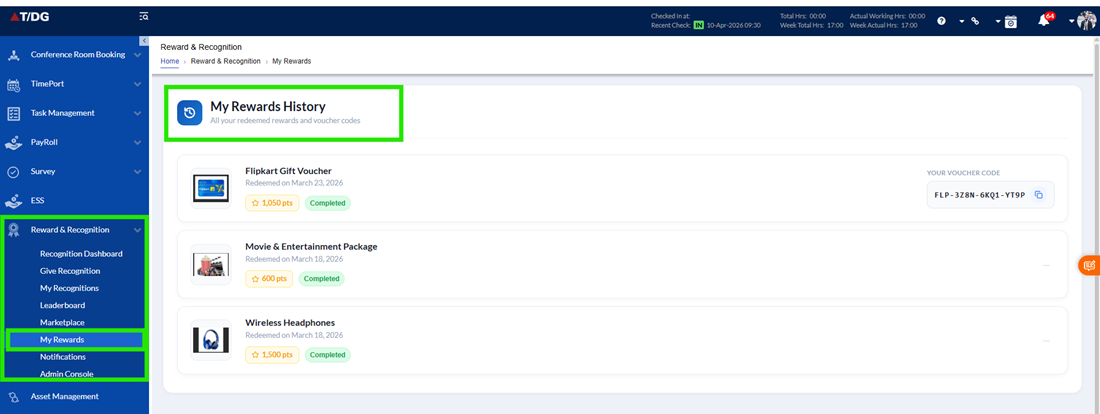
The My Rewards module provides employees with a centralized and organized view of all the rewards they have redeemed from the Marketplace.
It acts as a personal tracking dashboard, allowing users to monitor their reward history, check the status of each reward, and access important reward-related details such as voucher codes.
This section ensures complete visibility and transparency, helping users stay informed about their redeemed rewards and how to utilize them.
Key Features
- Rewards Listing
The My Rewards section displays a detailed list of all rewards that the user has redeemed. Each reward is presented with relevant information to help users easily identify and track their rewards:
- Reward Image
A visual representation of the reward, making it easier to recognize - Reward Title
The name of the redeemed reward - Redemption Date
The date on which the reward was successfully redeemed - Points Used
The number of points that were deducted from the user’s balance for the reward - Status
Displays the current state of the reward, such as:- Active
- Redeemed
- Delivered
- Or any other applicable status
This structured view allows users to quickly review their reward history and track the progress of each reward.
- Voucher Code Access
For certain types of rewards, such as gift cards or digital rewards, a voucher code is provided.
- Users can view the voucher code directly within the My Rewards section
- The voucher code can be used as per the instructions provided with the reward
- This ensures that users have easy and quick access to redeem or utilize their rewards without any confusion
The My Rewards module simplifies reward tracking by providing all necessary information in one place. With clear details, status updates, and easy access to voucher codes, users can efficiently manage and utilize their redeemed rewards.
This feature enhances the overall user experience by ensuring that rewards are not only earned but also easily tracked and effectively used.