
Asset Dashboard
The Asset Dashboard provides a consolidated view of asset-related information through graphical reports and summary widgets. It enables users to monitor asset availability, allocation status, expiry details, and category-wise distribution from a single dashboard. Users can apply filters such as Asset Category and Allocation Type to view relevant data and use the available chart options for analysis.
The Asset Dashboard includes the following key sections:
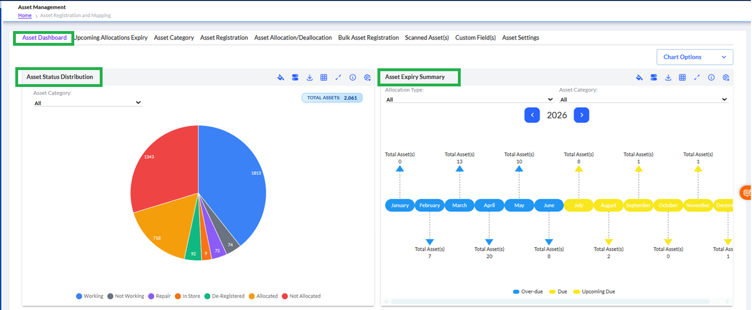
- Asset Status Distribution – Displays the overall distribution of assets based on their current status, such as Working, Not Working, Repair, In Store, De-Registered, Allocated, and Not Allocated.
- Asset Expiry Summary – Provides a month-wise summary of asset expiry based on the selected year, helping users track Overdue, Due, and Upcoming Due assets.
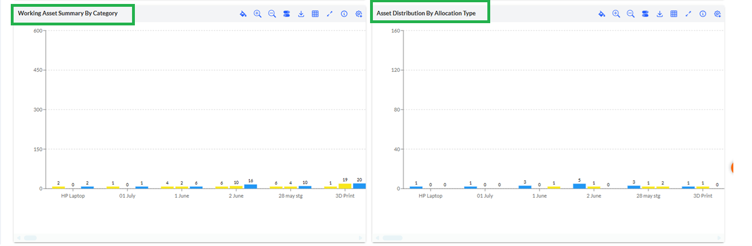
- Working Asset Summary by Category – Presents a category-wise comparison of working assets for quick analysis of asset availability.
- Asset Distribution by Allocation Type – Displays the distribution of assets based on their allocation type across different asset categories.
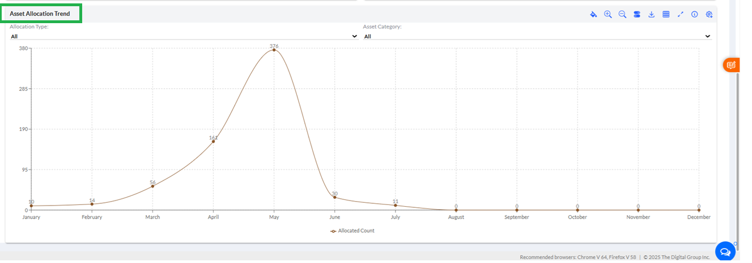
- Asset Allocation Trend(available further down the dashboard)– Shows asset allocation trends over a selected period to help monitor allocation patterns and utilization.
Each dashboard widget supports common actions such as filtering, zooming, printing, exporting, and full-screen view, allowing users to analyze and download dashboard information as required.