
RR - Leaderboard
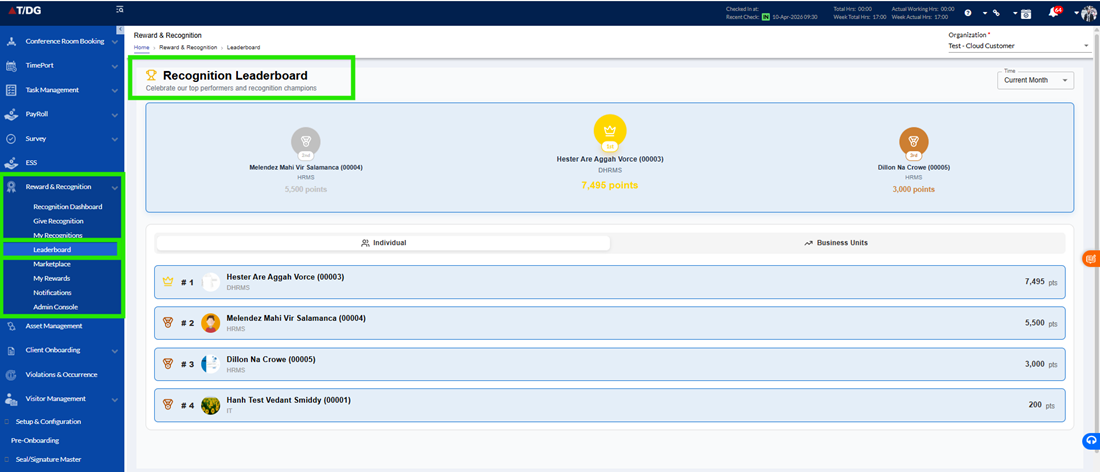
The Leaderboard module provides a competitive overview of employee achievements across the organization by ranking employees and business units based on earned points. It encourages engagement and motivates employees by showcasing top performers.
Overview
The Leaderboard module provides a dynamic view of how employees and business units are performing based on the points earned through recognitions. This feature is designed to encourage healthy competition, motivate employees, and promote a culture of appreciation within the organization. By showcasing top performers, it helps users understand where they stand and inspires them to actively participate in recognition activities.
The Leaderboard can be easily accessed from the Recognition Dashboard by clicking on the “View All” option in the Leaderboard section.
Leaderboard Sections
The Leaderboard is divided into two main sections to provide insights at both individual and organizational (business unit) levels.
- Individual Leaderboard
The Individual Leaderboard ranks employees based on the total points they have earned through recognitions.
This section highlights top-performing employees across the organization and provides visibility into individual achievements.
Metrics Displayed
Each employee entry includes the following details:
- Employee Name
Displays the name of the employee - Total Points
Shows the total number of points earned through recognitions - Rank
Indicates the employee’s position compared to others in the organization - Additional Insights
May include further details such as:- Points distribution
- Key achievements
- Recognition trends
This section helps:
- Recognize and highlight top performers
- Motivate employees to improve their ranking
- Encourage active participation in recognition activities
- Business Unit Leaderboard
The Business Unit Leaderboard ranks different departments or business units based on their collective recognition performance.
This provides a broader organizational view, showing how teams contribute to the overall recognition culture.
Metrics Displayed
Each business unit entry includes the following details:
- Business Unit Name
Displays the name of the department (e.g., IT, Administration) - Number of Employees
Indicates how many employees are part of the business unit - Average Points per Employee
Shows the average points earned per employee within the unit - Percentage Contribution to Total Points
Reflects how much the business unit contributes to the overall points earned across the organization
This section helps:
- Identify high-performing teams
- Encourage team-level collaboration and recognition
- Promote healthy competition between departments