
On Duty Request
The On Duty (OD) Request sub-module allows employees to submit attendance requests for offsite sessions, client visits, or business tours. Once approved by your manager, these requests ensure your time is officially treated as "Present" for attendance purposes.
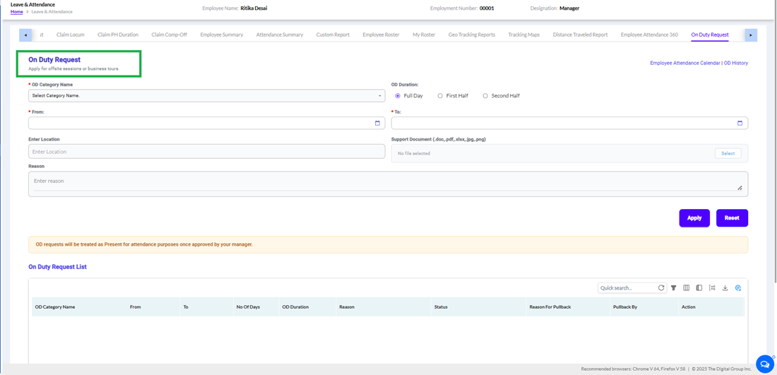
To apply for an offsite assignment, fill out the form using the following fields:
- OD Category Name (Required): Select the appropriate business reason or category from the dropdown list.
- OD Duration (Required): Choose whether the request applies to a Full Day, First Half, or Second Half.
- From / To Dates (Required): Use the calendar controls to specify the starting and ending dates of your offsite duty.
- Enter Location: Type the specific destination or offsite venue name.
- Support Document: Upload any relevant proof or documentation if necessary (Supported formats: .doc, .pdf, .xlsx, .jpg, .png).
- Reason: Provide a brief explanation regarding the purpose of your business travel or offsite session.
Click Apply to submit your request for manager approval, or click Reset to clear the form fields.
2. Tracking Your SubmissionsThe page features quick links in the top-right corner to jump to your Employee Attendance Calendar or view your comprehensive OD History.
At the bottom of the interface, the On Duty Request List grid tracks all submitted requests. It provides visibility into critical data columns, including:
- No. of Days and OD Duration
- Approval Status
- Reason For Pullback and Pullback By details (if an application needs to be recalled or edited)