
Custom Report
The Custom Report feature provides users with various attendance and leave-related reports based on selected criteria and filters. It enables administrators and HR users to generate customized reports for monitoring employee attendance, leave records, and attendance compliance across the organization.
Navigation:
Leave & Attendance >> Custom Report
The Custom Report section contains the following report options:
- Attendance Summary
- Leave Summary
- Attendance Compliance
In the displayed screen, the Attendance Compliance report is selected.
Attendance Compliance Report
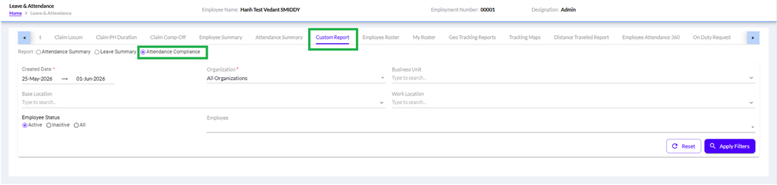
The Attendance Compliance report is used to monitor employee attendance adherence within a specified period. It helps HR and management identify employees who have complied with attendance policies and those who may have attendance irregularities.
This report can be generated for individual employees, departments, locations, business units, or the entire organization.
More about Attendance Compliance Report
The Attendance Compliance tab is used to review employee attendance against allocated working hours and identify attendance shortfalls for a selected period.
Steps to Generate the Report
- Select Attendance Compliance from the Report options.
- Enter the Created Date range.
- Select the required filters: like Organization, Business Unit, Base Location, Work Location, Employee
- Select the required Employee Status:
- Active – Displays attendance records of active employees only.
- Inactive – Displays attendance records of inactive employees only.
- All – Displays attendance records for both active and inactive employees.
- Click Apply Filters to generate the report.
- Use Reset to clear all selected filters.
Report Information Displayed
The report grid provides the following details:
Date of Joining, Employment Status, Employee Status, Functional Manager, Reporting Manager, Check-In Time, Check-Out Time, Attendance Duration, Attendance Status, Total Attendance Duration, Allocated Duration, Shortfall Duration
Report Selection
Under the Report section, the following report types are available:
Attendance Summary
It gives a summarized attendance report showing attendance-related details such as Present, Absent, Leave, Weekly Off, Holidays, and attendance counts for employees within the selected period.
Leave Summary
It gives a consolidated leave report containing leave balances, leave utilization, and leave records for selected employees or groups.
Attendance Compliance
It gives a compliance report based on employee attendance records and attendance policy adherence during the selected date range.
Filters Available
The Attendance Compliance report can be generated using the following filters:
1. Created Date
Specify the reporting period by selecting:
- From Date
- To Date
Only records falling within the selected date range will be included in the report.
2. Organization
Select the required organization from the Organization dropdown.
Examples:
- All Organizations
- Specific Organization (based on user access)
This field is mandatory.
3. Business Unit
Allows users to filter employees belonging to a specific Business Unit.
Examples:
- Human Resources
- Finance & Accounts
- Information Technology
- Marketing
4. Base Location
Filter employees based on their assigned base location.
Examples:
- Pune
- Mumbai
- Bangalore
- Delhi
5. Work Location
Filter employees according to their work location.
This is useful when employees are assigned to different operational locations than their base location.
6. Employee Status
The report can be generated for:
Active
Displays only currently active employees.
Inactive
Displays employees whose employment status is inactive.
All
Displays both active and inactive employees.
By default, Active employees are selected.
7. Employee
Select a specific employee to generate an individual attendance compliance report.
If left blank, the report will include all employees matching the selected filter criteria.
Action Buttons
Apply Filters
Click Apply Filters to generate the Attendance Compliance report based on the selected criteria.
The system retrieves and displays attendance compliance records matching the selected filters.
Reset
Click Reset to clear all selected filters and restore the default filter settings.
Attendance Compliance Report Usage
The Attendance Compliance report helps organizations:
- Monitor employee attendance behavior.
- Track attendance adherence across departments and locations.
- Review attendance compliance for audits and management reporting.
- Analyze attendance trends during a selected period.
- Generate employee-specific attendance compliance records.
- Support HR decision-making using attendance analytics.