
RR - My Recognition
The My Recognitions module is a personalized dashboard where employees can track all recognitions they have received and given. It provides a comprehensive view of achievements, contributions, and overall recognition performance within the organization.
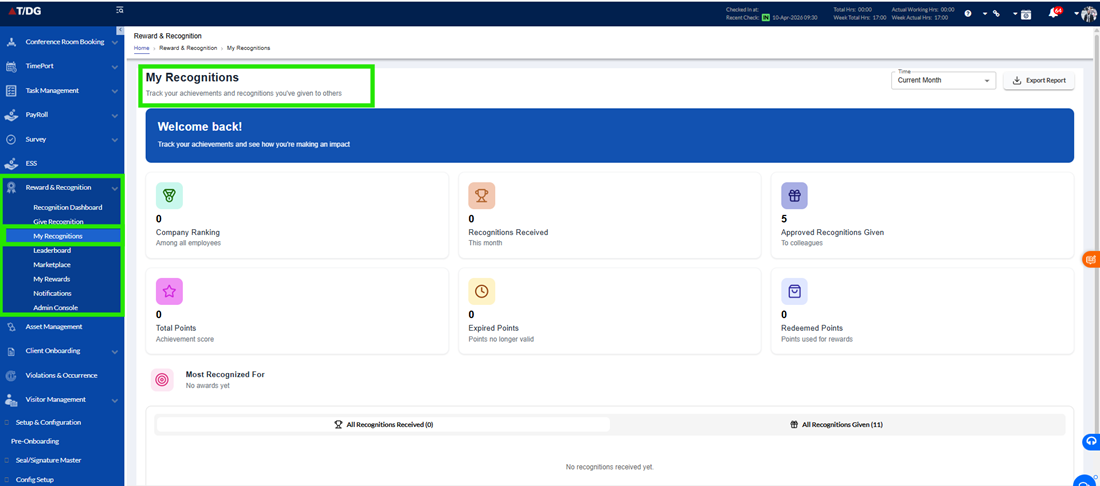
Overview
The My Recognitions module provides employees with a comprehensive view of all recognitions they have received as well as those they have given to others.
This section helps users track their recognition journey within the organization by offering insights into their performance, contribution, and engagement. It also provides a clear summary of recognition-related metrics, points earned, and overall standing within the company.
By consolidating all recognition data in one place, this module ensures transparency, easy tracking, and better visibility of an employee’s achievements and contributions.
A. Summary Section (Top Metrics)
At the top of the page, users can view a summary dashboard that highlights key performance indicators. These metrics provide a quick and meaningful overview of the employee’s recognition status and activity.
Company Ranking
This metric displays the employee’s rank within the organization based on recognition-related performance.
- It reflects how the employee compares with others
- A higher ranking indicates stronger recognition and engagement
Recognitions Received
This shows the total number of recognitions received by the employee within the current month.
- Helps track recent appreciation and achievements
- Provides visibility into ongoing performance and contributions
Approved Recognitions Given
This indicates the number of recognitions the employee has given to others that have been successfully approved.
- Reflects the employee’s participation in recognizing peers
- Encourages a culture of appreciation within the organization
Total Points
This displays the total points earned by the employee over a defined period.
- Points are typically awarded through recognitions
- These points can be used for redeeming rewards in the Marketplace
Expired Points
This shows the number of points that are no longer valid due to expiration.
- Helps users stay aware of unused points
- Encourages timely redemption of rewards
Redeemed Points
This metric reflects the total number of points that have already been used to redeem rewards.
- Provides a clear view of how points have been utilized
- Helps users track their redemption activity
Most Recognized For
This highlights the award category under which the employee has received the highest number of recognitions.
- Helps identify the employee’s key strengths or contributions
- Provides insight into areas where the employee is most appreciated
B. Recognition Tabs
The My Recognitions module is organized into two separate tabs to provide clear visibility into both recognitions received and recognitions given by the employee.
This structured division helps users easily navigate, track, and understand their recognition activities from both perspectives-how they are being appreciated and how they are appreciating others.
- All Recognitions Received
The All Recognitions Received tab displays a complete list of all recognitions that the logged-in employee has received from across the organization.
This section provides detailed insights into how the employee’s contributions and achievements are being acknowledged.
Details Included
Each recognition entry includes the following information:
- Recognition Name / Title
Displays the title of the recognition, indicating the purpose or category of the award - Recognized By
Shows the name of the employee who has given the recognition - Date of Recognition
Indicates the date when the recognition was awarded - Points Earned
Displays the number of points received for the recognition
(Typically shown on the right side for quick visibility) - Recognition Type
Specifies whether the recognition is:- Public – Visible to others in the organization
- Private – Visible only to relevant users
- Points Status
Indicates the current status of the awarded points:- Active – Points are available for use
- Expired – Points are no longer valid
- Partially Expired – Some points remain valid while others have expired
This tab helps employees:
- Understand how their work is being recognized
- Track earned points and their validity
- Gain visibility into their achievements and appreciation
- All Recognitions Given
The All Recognitions Given tab displays all recognitions that the logged-in employee has submitted to recognize others.
This section provides a complete record of the user’s participation in appreciating colleagues.
Details Included
Each recognition entry includes the following information:
- Recognition Name / Title
Displays the title of the recognition - Recognized Employee
Shows the name of the employee who received the recognition - Date of Recognition
Indicates when the recognition was submitted - Points Assigned
Displays the number of points allocated to the recognized employee - Recognition Type
Specifies whether the recognition is:- Public – Visible across the organization
- Private – Visible only to specific users
- Approval Status
Displays the current status of the recognition request:- Approved – Recognition has been successfully approved
- Rejected – Recognition was not approved
- Pending Approval – Awaiting review by Admin/HR
Unlike the Received tab, this section includes all recognitions, regardless of their approval status.
This helps employees:
- Track the recognitions they have submitted
- Monitor approval progress
- Understand whether recognitions were approved, rejected, or are still pending