
My OT Requests
The employee can click on the My OT Requests tab to view all their Overtime (OT) request details, organized into two distinct sections — Upcoming OT and Completed OT as highlighted in the screenshot below.
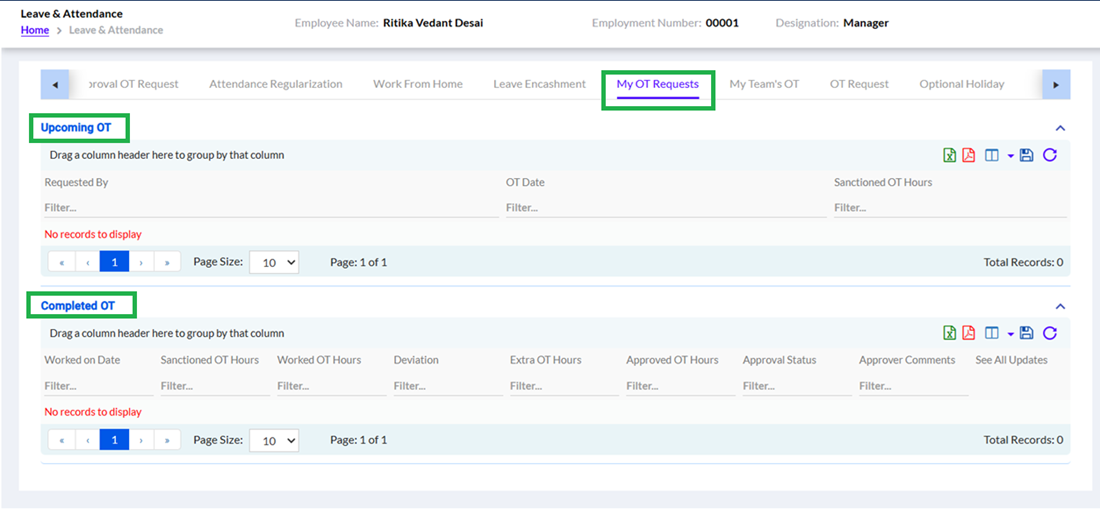
The Upcoming OT section displays all scheduled or sanctioned OT requests that are yet to be worked, showing details such as Requested By, OT Date, and Sanctioned OT Hours. If no upcoming OT requests have been raised, the section will display "No records to display."
The Completed OT section provides a comprehensive record of all OT that has already been worked, with detailed columns including Worked on Date, Sanctioned OT Hours, Worked OT Hours, Deviation, Extra OT Hours, Approved OT Hours, Approval Status, Approver Comments, and See All Updates. If no completed OT records are available, the section will display "No records to display."
The employee can use the Filter fields available under each column to search for specific records and can also use the page navigation controls to browse through multiple records. Additionally, the export icons available on the top right of each section allow the employee to download or print the OT data as needed.