
Asset Settings
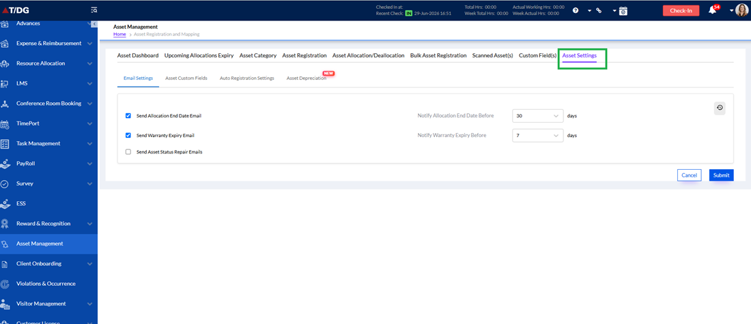
The Asset Settings tab is used to configure system-level notifications and custom settings related to asset management. This section helps administrators automate alerts for asset allocation end dates, warranty expiries, and asset repair requirements. By enabling these options, the system ensures timely communication and better tracking of asset lifecycle events.
Under the Email Settings section, users can configure the following options:
- Send Allocation End Date Email:
Enable this option to send reminder emails before the asset allocation period ends. The number of days before the end date can be specified in the Notify Allocation End Date Before field. - Send Warranty Expiry Email:
Enable this option to notify users before the warranty of an asset expires. The notification period can be configured in the Notify Warranty Expiry Before field. - Send Asset Status Repair Emails:
Enable this option to trigger email notifications related to asset repair status updates.
After selecting the required settings, click Submit to save the configuration or Cancel to discard the changes.
Functionality:
This setup helps organizations automate important asset-related reminders, reduce manual follow-up, and ensure timely action on expiring allocations, warranties, or repair requirements.
Asset Settings Enhancements
Two new functionalities have been added under Asset Settings:
a) Asset Setting Edit History
Whenever any changes are made to asset email notification settings (such as allocation end date reminder, warranty expiry reminder, or repair reminder), the system now maintains an Edit History.
This history stores:
- Modified settings
- Modified by
- Date and time of change
Functionality:
- Tracks changes made to asset notification settings.
- Provides audit history for administrators.
b) Custom Days Input for Email Notifications
Previously, users could select predefined days from a dropdown for triggering reminder emails. Now users can manually enter the number of days for email triggers.
Limit: Up to 990 days
Functionality:
- Allows flexible reminder scheduling.
- Supports custom notification periods.