
RR - Give Recognition
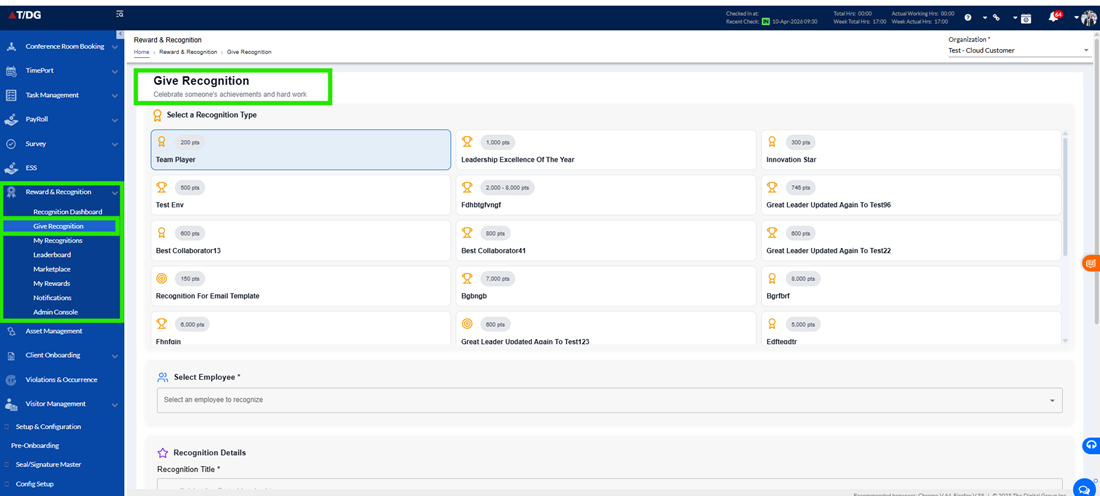
The Give Recognition module enables employees to appreciate and reward their peers using predefined and approved recognition templates. It provides a structured and user-friendly way to acknowledge contributions and achievements within the organization.
Overview
Only approved Recognition Types (templates) are available for use in this section. These templates are predefined and configured through the Admin Console, ensuring that every recognition adheres to a defined structure, includes relevant details, and follows the necessary approval workflow.
By using these templates, employees can easily select the appropriate recognition type and submit their appreciation in a guided and organized manner.
Recognition Process Flow
Giving recognition involves a step-by-step process that guides users from selecting a template to final approval. Each step is designed to ensure accuracy and completeness of the recognition.
- Select Recognition Template
The first step is to choose a Recognition Template.
Users can view a list of all available and approved templates. These templates represent different types of awards, such as performance-based recognitions, appreciation awards, or special acknowledgements.
Once a template is selected:
- The system automatically displays the relevant fields associated with that template
- The structure of the recognition is defined based on the selected template
- Users are guided on what information needs to be filled
This ensures that all recognitions are created in a standardized and organized manner.
- Select Employee
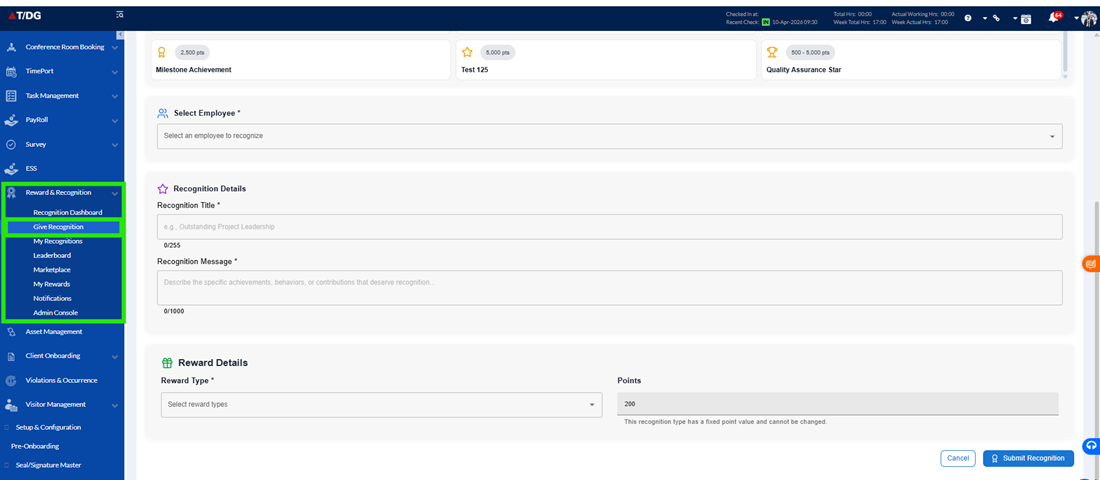
After selecting the template, users need to choose the employee to be recognized.
- Users can search and select the appropriate employee
- This ensures that the recognition is assigned to the correct individual
- It helps avoid errors and ensures proper tracking of recognition
- Recognition Details
This section captures the main information about the recognition and is essential for making the appreciation meaningful.
- Recognition Title
Users need to provide a title for the recognition. This title reflects the purpose or category of the award and helps in clearly identifying the type of recognition being given. - Recognition Message
Users should enter a personalized message to appreciate the employee. This message should highlight:- The employee’s contribution
- Their achievements
- The impact of their work
A clear and thoughtful message makes the recognition more valuable and impactful.
- Reward Details
In this step, users define the reward associated with the recognition.
- Reward Type
Users select the reward type from the options available in the selected template.
These rewards can include:- Monetary rewards
- Non-monetary rewards
This ensures that recognition can be both symbolic and rewarding, depending on the configuration.
- Points Allocation
If the selected template includes points, users can assign points as part of the recognition.
- Points Type
- Fixed Points – A predefined number of points is automatically assigned
- Variable Points – Users can select points within a specified range
- Points Value
The final points awarded depend on the selected points type. This allows flexibility while ensuring limits are followed.
- Submission
Once all required details are filled:
- The user clicks on the Submit button
- The recognition request is submitted to the system
After submission:
- The recognition is not immediately finalized
- It is sent to the Notifications (Approval Queue) for review
This step ensures that all recognitions are verified before being awarded.
- Approval & Final Assignment
After submission, the recognition request is reviewed by Admins or HR, based on the configured approval workflow.
- The request is checked for accuracy and compliance
- The approver can either:
- Approve the recognition
- Reject the recognition
Upon Approval:
- The recognition is officially awarded to the selected employee
- Points and rewards (if applicable) are assigned
- The recognition becomes visible in:
- Recognition Dashboard
- Employee Profile
- Other relevant sections
This ensures that the recognition is properly recorded and visible across the system.