
Pre- Approval OT Request
In this tab, the employee can create and view Pre-Approval OT (Overtime) Requests under the Leave & Attendance module, as highlighted in the screenshot below. This feature allows employees to request overtime approval in advance before performing extra working hours.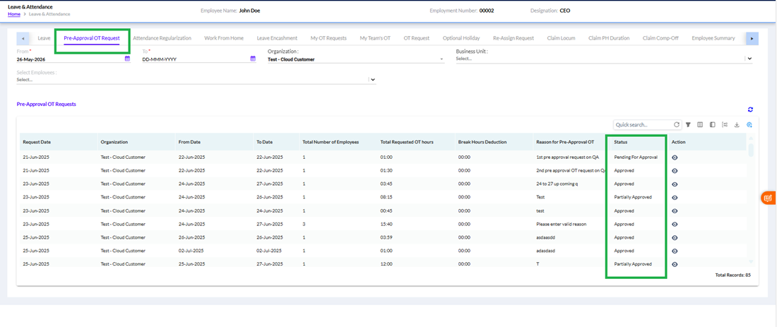
The user can filter OT requests using the following fields:
- From Date and To Date
- Organization
- Business Unit
- Employee Selection
- The lower section displays the list of submitted Pre-Approval OT requests with details such as:
- Request Date
- Organization
- From Date and To Date
- Total Number of Employees
- Total Requested OT Hours
- Break Hours Deduction
- Reason for Pre-Approval OT
- Status
- Action
Status
The following statuses are displayed in the Status column:
Pending For Approval – The OT request has been submitted and is awaiting approver action.
Approved – The complete OT request has been approved successfully by the approver.
Partially Approved – Only part of the requested OT hours or selected employee requests have been approved.
Rejected – The OT request has been rejected by the approver and will not be processed further.
Cancelled – The OT request has been cancelled by the employee or administrator before approval completion.
The Action column allows the user to view detailed OT request information and approval workflow details.