
LA - Approval History
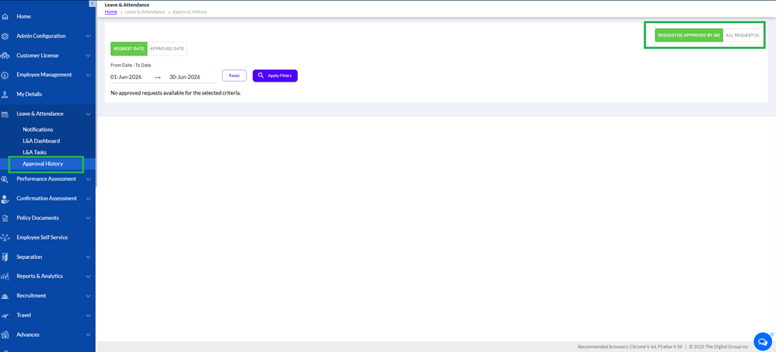
With the help of this tab, the user can view the Approval History under the Leave & Attendance tab, as highlighted in the screenshot below. All requests approved by the logged-in user are saved and displayed in this section for future reference and tracking purposes.
The page contains two tabs:
- Request Date – Displays approved requests based on the request submission date.
- Approved Date – Displays approved requests based on the approval completion date.
The user can select the From Date and To Date range to filter approved requests for a specific period. After selecting the required dates, the user needs to click the Apply Filters button to fetch records. The Reset button clears the selected filter criteria.
The Request(s) Approved by Me tab displays all requests approved by the logged-in user. The adjacent tab allows the user to view all available approval records, depending on access rights.
If no approved requests are available for the selected criteria, the system displays an informational message accordingly. This page helps users maintain approval tracking, audit history, and request verification records within the system.
The Approval History has been enhanced to give users and managers better visibility into leave and attendance requests. Users can now toggle between requests specifically approved by them and a broader overview of all completely approved requests.
- Accessing Approval History & "Request(s) Approved By Me"
To view history, navigate to Leave & Attendance>Approval History from the left-side menu.
By default, the view opens to the Request(s) Approved By Me tab. This view is strictly filtered to display only the specific leave and attendance requests that the logged-in user manually reviewed and approved. Note that system-generated, auto-approved requests will not appear in this view.
- Viewing "All Request(s)" and Advanced Filters
Clicking on the All Request(s) tab displays a complete list of all fully approved requests across the organization or designated scope.
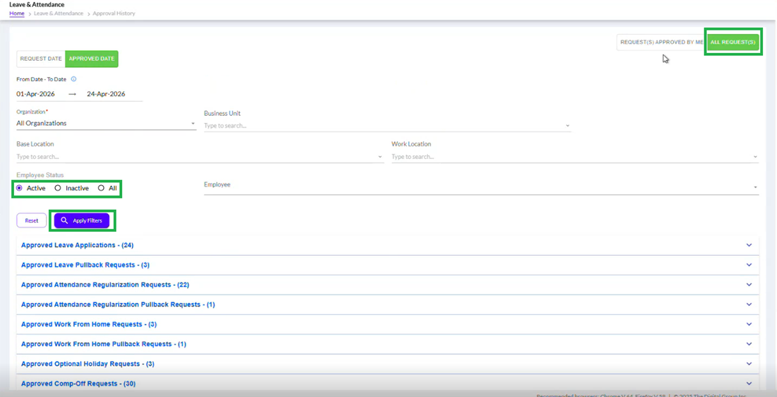
- Completion Criteria: A request will only appear in this section if it has successfully passed all levels of approval (e.g., if L1 has approved but L2 is still pending, it will not appear here).
- Available Filters: You can filter these records using multiple fields such as Date range (Request Date or Approved Date), Organization, Business Unit, Base Location, Work Location, and Employee Status (Active, Inactive, or All). Click Apply Filters to update the list.
- Supported Categories: This covers all leave and attendance categories, including Leave Applications, Pull Backs, Attendance Regularizations, Work From Home, Comp-Offs, Optional Holidays, Overtime Claims, and Pre-Approvals.
- "Approved By" Column & System Auto-Approvals
When expanding any of the approved categories under the All Request(s) tab, an Approved By column is available in the data grid.
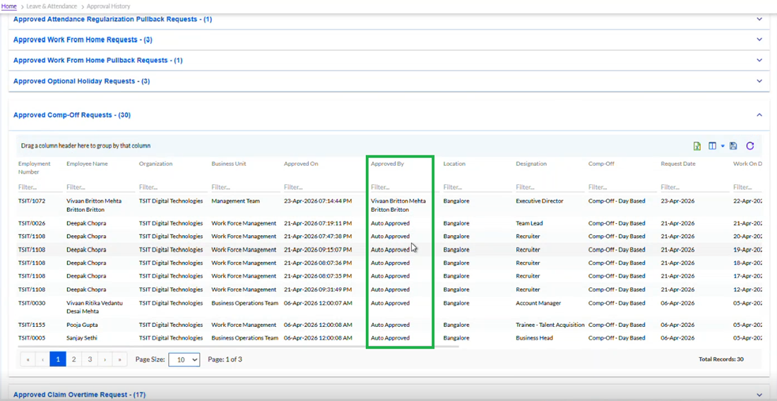
- This column clearly identifies who provided the final approval for the request (displaying individual manager names like L1/L2 details).
- Because this tab capturesallfinalized requests, it also includes system-processed requests, which will explicitly display as Auto Approved in this column.