Simplify Business Travel Management for Your Employees
Manage travel requests, itineraries, approvals, and travel reports through one centralized travel management system.
Make Employee Travel Management Simple and Transparent
Managing business travel manually can make it difficult to track travel requests, itineraries, approvals, and travel reports. Digital HRMS provides a centralized travel management system that allows employees to raise travel requests and manage employee travel & expenses, while enabling managers and HR teams to review and approve requests from a single platform.
With configurable workflows, real-time request tracking, and detailed reports, organizations can simplify business travel management and give employees and HR teams better visibility and control over every request, from the initial travel request to the travel itinerary and final reporting.
Common Challenges in Managing Employee Travel
Without a structured digital process, managing business travel requests can involve unnecessary follow-ups, delayed approvals, and limited visibility for HR and travel desk teams.
Manual Travel Request Processing
Managing travel requests through emails, spreadsheets, or manual forms can make it difficult to maintain accurate and centralized records.
Delayed Approvals
Travel requests may require multiple levels of review, making manual follow-ups time-consuming for employees, managers, and HR teams.
Limited Itinerary Visibility
Employees and approvers may have difficulty tracking whether a travel request, itinerary, or travel report is submitted, in process, approved, or rejected.
Difficult Advance & Expense Tracking
Tracking requested travel advances and associated employee travel & expenses manually can complicate financial monitoring.
Managing Multiple Employee Requests
HR and managers may need to review travel requests from several employees while filtering them by organization, status, or business unit.
Reporting and Compliance Gaps
Maintaining complete records of travel requests, itineraries, and approvals is important for financial oversight and compliance.
How Digital HRMS Simplifies Travel Management
Digital HRMS brings travel requests, itineraries, approvals, and reporting into a centralized human resource management environment.
Easy Travel Request Submission
Employees can raise domestic and international travel requests and submit the required trip information through a centralized travel management system.
Automated Workflows
Configurable approval workflows help route travel requests to the appropriate managers and stakeholders for timely action.
Real-Time Request Tracking
Employees and authorized users can monitor travel request status and access relevant itinerary details without relying on manual follow-ups.
Centralized Notification Hub
Approvers can view pending travel requests, pending itinerary requests, and pending travel reports from a single, organized workspace.
Advance & Itinerary Visibility
Employees and managers get clear visibility into requested travel advances, itineraries, and trip status at every stage.
Reports and Travel Oversight
Detailed travel reports provide a structured view of requests and their current status, supporting better monitoring and decision-making.
See Business Travel Management in Action
Explore how Digital HRMS simplifies travel requests, itineraries, approvals, and reporting.

Key Features of the Digital HRMS Travel Management System
Digital HRMS brings travel requests, itineraries, approvals, advances, and reporting together in one centralized travel management system. The module supports automated workflows, request tracking, organization-level filtering, and detailed reports to help organizations manage employee travel & expenses with greater visibility, control, and compliance.
Explore the Digital HRMS Travel Module
The updated Travel module organizes travel management into Travel Requests and Report, with Notifications and My Requests views for day-to-day travel itinerary management.
Users can create travel requests by defining the travel type, purpose and date in Digital HRMS travel management system, as shown below and view a list of raised travel requests. The user can raise both domestic and overseas travel requests. They can “Add Traveler” if required. There is also a provision for the manager to raise requests for the team.
Users can also request advance payments in various currencies (INR, FJD, USD).
Four Types of Requests Viewed in the Travel Request Tab
My Requests- The new requests can be created and their status can be viewed here.
Team Requests- The Manager of a team can create and manage requests on behalf of his team members.
All Requests- The Admin/HR will be able to check all travel requests and approve or reject requests on behalf of managers and can add/edit expense limits.
Advance Requests- The requests for advances on travel are raised, tracked, and managed here, including amounts requested in multiple currencies such as INR, FJD, and USD.
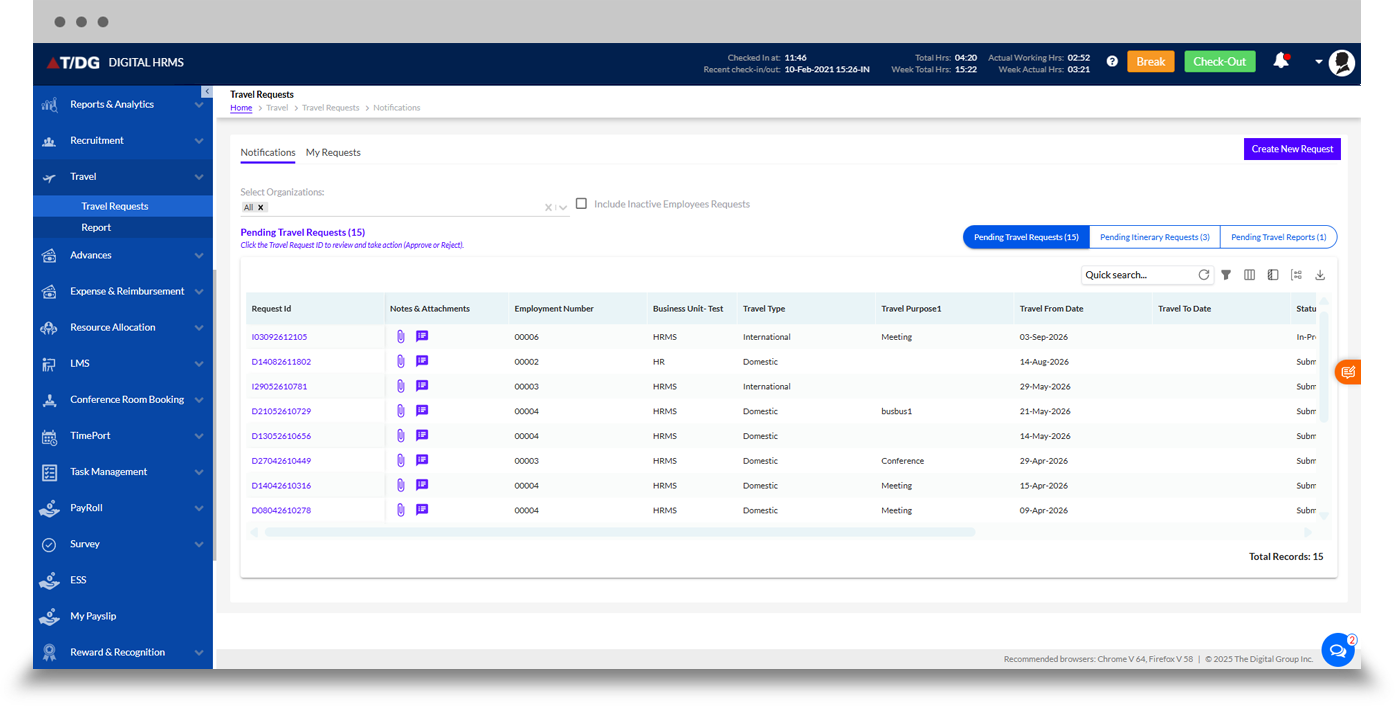
The Notifications view provides a centralized workspace for monitoring pending travel activity that requires action. Users can select organizations and choose to include inactive employees' requests, while the dashboard separates items into Pending Travel Requests, Pending Itinerary Requests, and Pending Travel Reports, each with a live count.
The request grid displays details such as Request ID, notes and attachments, employment number, employee name, business unit, organization, travel type, travel purpose, travel dates, and status, giving approvers a clear view of everything awaiting their attention.
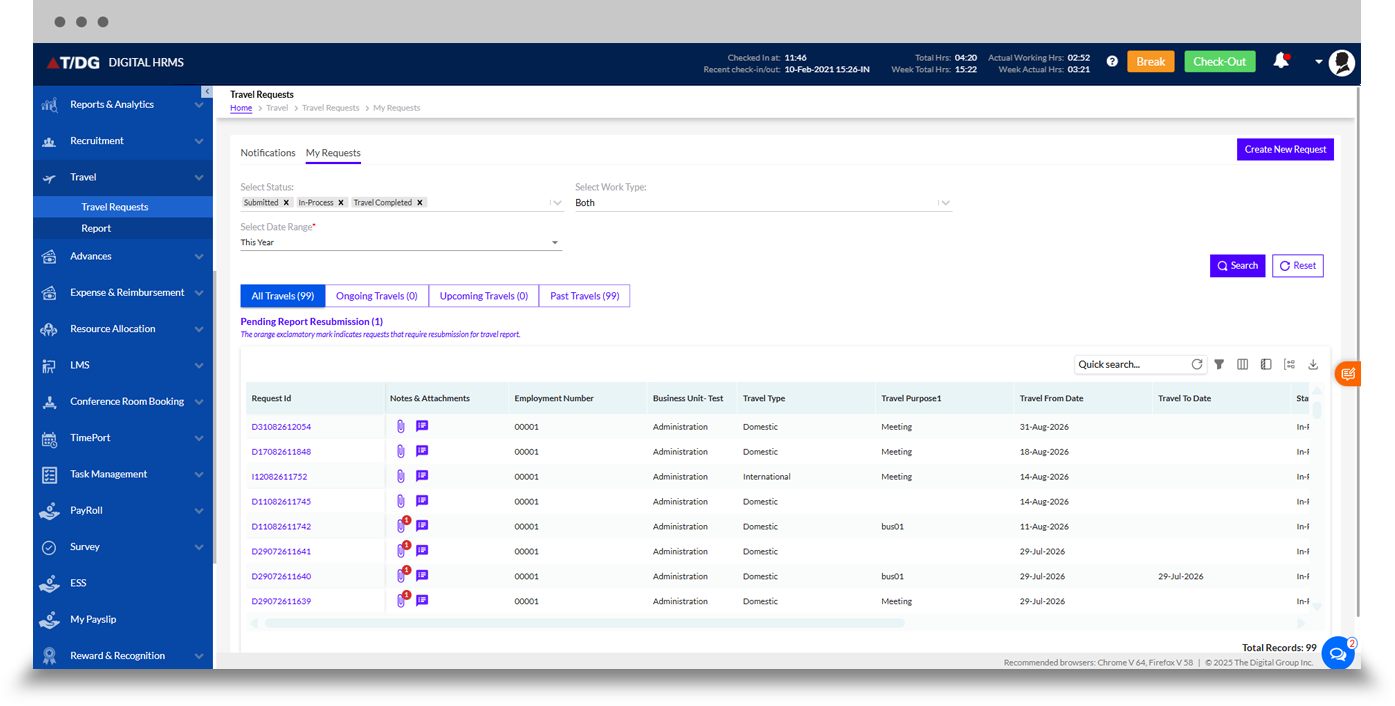
The My Requests view is designed for employees to monitor their own travel requests. Users can filter requests by status (such as Submitted, In-Process, and Travel Completed), work type, and date range.
Requests can be reviewed across All Travels, Ongoing Travels, Upcoming Travels, and Past Travels tabs, with a dedicated Pending Report Resubmission indicator that flags travel reports requiring resubmission. The grid provides request ID, notes and attachments, employment number, business unit, travel type, travel purpose, and travel dates for each trip.
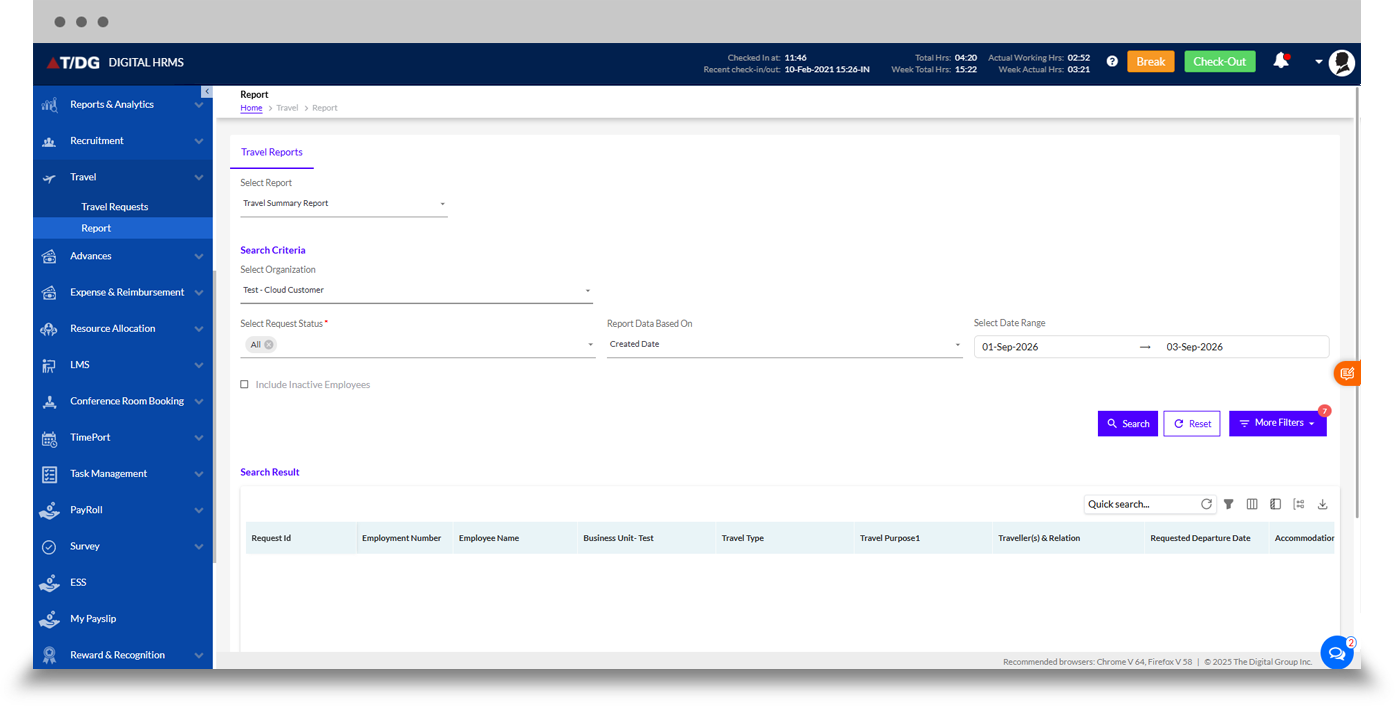
The Report section provides a Travel Summary Report along with configurable search criteria, including organization, request status, report data based on created date or travel date, date range, and the option to include inactive employees, plus additional filters for deeper analysis.
The search results grid shows information such as Request ID, employment number, employee name, business unit, travel type, travel purpose, traveller(s) and relation, requested departure date, and accommodation details, helping HR and travel desk teams maintain complete visibility and export data as needed.
Why Choose Digital HRMS for Business Travel Management?
Faster Request Processing
Reduce manual effort by moving travel requests and approvals into a centralized digital workflow.
Better Employee Visibility
Give employees a clear view of their travel requests, itineraries, statuses, and report status.
Efficient Manager Approvals
Help managers review, partially approve, reject, or modify travel and advance requests quickly.
Stronger Financial Control
Provide HR and finance teams with visibility into requested advances and cost-centre wise travel spend.
Improved Compliance
Maintain structured travel records and reporting information to support organizational policies and compliance requirements.
Connected HR Management
Integrate travel management with other Digital HRMS modules to create a more connected hr software ecosystem.

Learn More About Employee Travel Management
Discover how Digital HRMS can help your organization manage employee travel, automate approvals, improve itinerary visibility, and support compliant business travel management.
Make Business Travel Management Easier with Digital HRMS
Move beyond manual travel processing with a centralized travel management system designed to simplify travel requests, automate workflows, improve itinerary and approval visibility, and support accurate reporting.